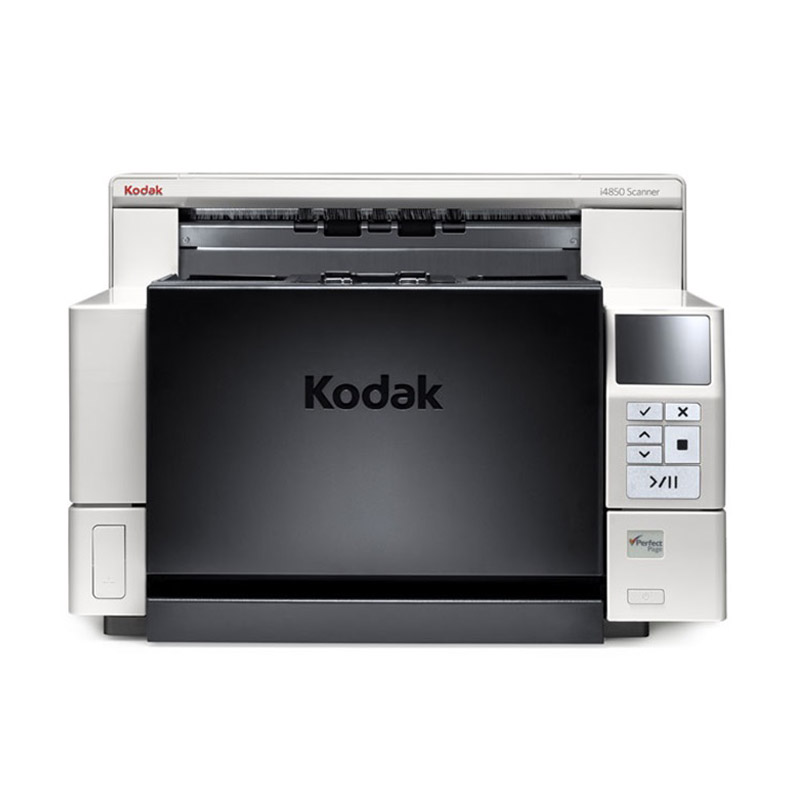
Your busy mailroom, production scanning department or service bureau needs the most productive, accurate, and reliable information capture on the market. The KODAK i4000 Series Scanners are part of our award winning scanner line, and are the right fit for your most demanding jobs.
KODAK i4000 Series Scanners feature a 500-sheet input elevator for continuous document feeding, with a straight through paper path for feeding materials such as cardboard, file folders, and extra-long documents.
Keep Pace with Today’s Work
The Kodak i4000 Series offers a host of features combined with our exceptional image quality to help you deliver high productivity. Get crisp, clear images even with challenging originals, thanks to Perfect Page image processing. And Dual LED technology produces excellent OCR read rates for more precise data extraction with no loss of scanning speed.
Superior Paper Handling Delivers Unbeatable Reliability
Our exclusive paper feeding technology captures virtually any document in almost any condition for unbeatable reliability. The Kodak i4000 series has four layers of document protection to safeguard your important documents.
Length detection protects against papers getting overlapped and appearing as one long document
Double document detection ensures that only one document enters the scanner at a time, which is especially helpful when a small document sticks together with a larger document
Intelligent document protection “listens” for a telltale crumpling sound and immediately stops the scanning process
Metal detection prevents forgotten staples and paper clips from scratching the scanner glass
Flawless Integration that Saves Time and Money
The Kodak i4000 series delivers business value by finding the fastest, most efficient ways to enhance your workflows. With multi-zone barcode recognition, the driver reads barcode values to extract metadata, enabling easy integration with line-of-business systems. Combine the scanner with Kodak Info Input Solution web capture software and you can manage applications, job setup, and users, as well as capture and index information from a centralized capture location.
Description
Product Highlights
The best Interactive Multifeed Recovery system of any scanner on the market today. Prevent potential document damage with Intelligent Document Protection and Metal Detection that detects staples, paper clips or other things that can slow you down. Monitor multifeeds and quickly choose to accept, ignore or rescan images before sending to an application.
Throughput Speeds *
160 ppm / 320 ipm
Feeder Capacity
Up to 500 sheets of 80 g/m² (20 lb.) paper
Connectivity
USB 3.2 Gen 1×1 Certified
Maximum Document Size
305 mm x 9100 mm (360 in. x 12 in.)
Paper Thickness & Weight
45-200 g/m² (12-110 lb.) paper
Maximum Optical Capture Resolution
600 dpi
Accessories & Consumables
Document Extenders
Feeder Consumables Kits
Imaging Guide Set
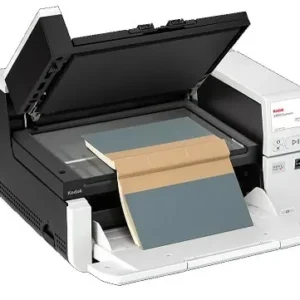
KODAK A3 Size Flatbed Accessory
KODAK Enhanced Printer Accessory
Printer Cleaning Pads
Printer Ink Cartridge and Carrier
Switchable Black/White Background
Acoustical Noise
Scanning: <63 dB(A)
Approvals and Product Certifications
Argentina (S mark)
Australia/New Zealand (RCM)
Canada (cTUVus & ICES-003)
China (CCC)
European Union (CE)
European Union (GS Mark)
India (BIS)
Japan (VCCI)
Mexico (NOM)
Russia/Eurasian Economic Union (EAC)
South Korea (KC)
Taiwan (BSMI)
US (cTUVus & FCC)
Barcode Reading
Codabar
Code 128
Code 3 of 9
EAN-13
EAN-8
Interleaved 2 of 5
PDF417
QR
UPC-A
UPC-E
Data Security
This scanner processes scanned data exclusively through volatile memory ensuring image data is effectively erased upon shut down. Thank you for reading this post, don't forget to subscribe!
Dimensions & Weight
Height: 34.79 cm (13.7 in.)
Width: 48.9 cm (19.2 in.)
Depth: 46.73 cm (18.4 in.) with tray closed
Depth: 61.30 cm (24.1 in.) with tray open
Weight: 30.4 kg (67 lb.)
Electrical Requirements
100-240 V (International); 50-60 Hz
Environmental Certification
2008 EuP
ENERGY STAR Qualified
EPEAT Silver
Image Output Resolution Options
Up to 600 dpi
Minimum Document Size
50.8 mm x 63.5 mm (2 in. x 2.5 in.)
File Format Outputs
BMP
JPEG
Single-page TIFF
Microsoft Excel
Microsoft Word
Multipage TIFF
PDF
Text searchable PDF
PNG
RTF
Operating System Compatibility
WINDOWS 10 (32- and 64-bit)
WINDOWS 11 (64 bit)
WINDOWS Server 2012 R2 X64 Editions
WINDOWS Server 2016 X64 Editions
WINDOWS Server 2019 X64 Editions
WINDOWS Server 2022 X64 Editions
Ubuntu 20.04 64-bit
Ubuntu 18.04 64-bit
Open SUSE 13.2 (i586) 32-bit
Open SUSE LEAP 15.2 64-bit
SUSE Linux Enterprise Desktop 12.2 64-bit
SUSE Linux Enterprise Desktop 15 SP1 for 64-bit
Neokylin-NKLD-V7_U2-ZX64-REL-build54
Operating Temperature / Operating Humidity
Operating Temperature 15-35° C (59-95° F)
Operating Humidity 15% – 80% RH
Operator Control Panel
3.5 inch (89 mm) graphical color LCD with operator control buttons
Optional Software
Capture Pro Software
Info Input Solution
Paper Path Options
Documents can exit into the front output tray, or at the rear of the scanner if the straight-through paper path option is manually selected
Paper Handling (SurePath) Features
Controlled stacking
Enhanced jam recovery
Intelligent Document Protection
Interactive multifeed with image display on host
Interactive Operator Control Panel (OCP)
Metal (staple) detection
Length Multifeed Detection
Operator overrides
Ultrasonic Multifeed Technology
Perfect Page Image Enhancement Software
Adaptive threshold processing
Aggressive cropping
Auto white balance
Autocrop
Automatic color balance
Automatic color detection
Automatic orientation
Barcode reading
Color-on-the-fly toggle patch
Content-based blank page removal
Deskew
Electronic color dropout
Enhanced color adjustment
Enhanced color management
Fixed cropping
Fixed thresholding
Front side printer
Halftone removal
Image edge fill
Image hole fill
Image merge
iThresholding
Lone Pixel Noise Removal
Multicolor dropout
Automatic orientation
Orthogonal rotation
Output Compression-CCITT Group IV, JPEG, Uncompressed Output
Relative cropping
Image hole fill
Sharpening
Streak filtering
Power Consumption
Running: less than 130 watts
Sleep Mode: less than 1.5 watts
Standby: less than 0.5 watts
Price
Recommended Daily Volume
Up to 150,000 pages per day
Recommended PC Configuration
INTEL CORE i5 (Sandy Bridge or newer), running @ 2.7 GHz or higher, USB port 3.0 (Super Speed) or 2.0 (High Speed), 4 GB RAM or more
Scanning Technology
Dual White LED Illumination CCD; Grayscale output bit depth is 256 levels (8-bit); color output bit depth is 24 bits (8 x 3); color capture bit depth is 48 bits (16 x 3)
Standard Software And Drivers
KOFAX certified
ISIS Drivers
LINUX (TWAIN and SANE) Drivers
TWAIN Drivers
WIA Drivers
Kodak scanners in India | buy Kodak Alaris online from ScanBiz.in with offers and discount | Kodak Authorized Channel Partner
* Throughput speed may vary depending on your choice of driver application software, operating system, PC and selected image processing features.
Additional information
Weight
32 kg
Downloads
You can download the Brochures for the product here:
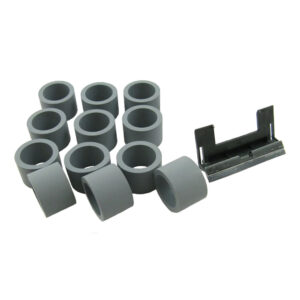
Consumable Kit for the Kodak Alaris i2000 Series.
Compatible with
i1200/i1300, i1200 Plus/i1300 Plus, i2400/i2600/i2800/i2420/i2620/i2820
Includes
12 feed rollers and 1 separation pad
₹6,562.00Original price was: ₹6,562.00.₹6,500.00Current price is: ₹6,500.00.(incl. 18% GST)
Get GST invoice and save up to 18% on business purchases. We allow registered users to purchase products for their business use. You will receive a business (GST) invoice with your company name and GST number.
Here’s How:
Create your free ScanBiz user account with us.
Add the products in your cart and proceed to checkout.
During Checkout, select ‘Use GSTIN for Business Purchase’ checkbox.
Add your shipping and billing details in the address section.
Complete the order and you shall receive a business (GST) invoice along with your delivered orders.
Your billing details will be saved with us for quicker checkout for your next purchase.
You can edit the billing details any time later for your next purchase.
Please note that currently GST is mandatory for getting business invoices.
Kindly provide correct billing details during checkout.
ScanBiz is not responsible if the customer has entered incorrect billing details resulting in the customer not receiving the input tax credit while filing returns.